
Tired of turning Wi‑Fi on and off? Here’s how to schedule it on your iPhone
Apple doesn’t include this feature natively in iOS, but the Shortcuts app, available on the App Store, lets you build this automation in just a few steps. Leaving Wi‑Fi on all the time drains battery without you noticing: the phone constantly searches for networks in the background, just like it does with Bluetooth and NFC. The good news is that iPhone let you automate this process so the connection turns on when you get home and turns off when you leave — no manual action needed.
Why it’s better to automate Wi‑Fi instead of leaving it always on
Keeping Wi‑Fi permanently enabled has a clear advantage: your phone automatically connects to any known network as soon as it’s in range. But it comes at a cost many people overlook. When no network is available, the device keeps scanning its surroundings for signals, silently draining the battery.
Turning it off manually when you leave solves that problem, but it requires remembering to do it every time. The alternative is to let the phone make that decision based on your location.
Some Android manufacturers, like Samsung and Google with its Pixel devices, include a native feature that turns Wi‑Fi on when the phone detects proximity to a saved network. On Pixel phones, this logic also applies to other relatively “stock” versions of Android, with one caveat: the feature turns the connection on when you get close, but it doesn’t turn it off when you move away—you have to do that manually.
Turning it off manually when you leave solves that problem, but it requires remembering to do it every time. The alternative is to let the phone make that decision based on your location.
How to schedule Wi‑Fi automatically on iPhone with Shortcuts
Apple doesn’t include this feature natively in iOS, but the Shortcuts app lets you create this automation in a few steps. The result is the same: Wi‑Fi turns on when you arrive at a place and off when you leave.
To program the activation:
- Open Shortcuts and go to the “Automation” tab in the bottom center.
- Tap “New Automation,” choose “Arrive,” and select the desired location, such as your home address.
- Enable “Run Immediately” and tap “Next.”
Inside the automation:
- Tap “New Blank Automation,” then “Add Action,” and search for “Wi‑Fi.”
- Select “Set Wi‑Fi,” which will configure the action as “Turn Wi‑Fi On.”
- That completes the first part.
To program automatic shutoff when leaving:
- Repeat the same steps, but choose “Leave” instead of “Arrive.”
- When you reach the action step, change “Turn Wi‑Fi On” to “Turn Wi‑Fi Off.”
- Once saved, your iPhone will have the full cycle set up.
If you want to replicate this automation for other places, like the office or gym, you’ll need to configure each location separately using the same steps. In practice, it’s best to set up two or three automations for your most frequent places and handle the rest manually.
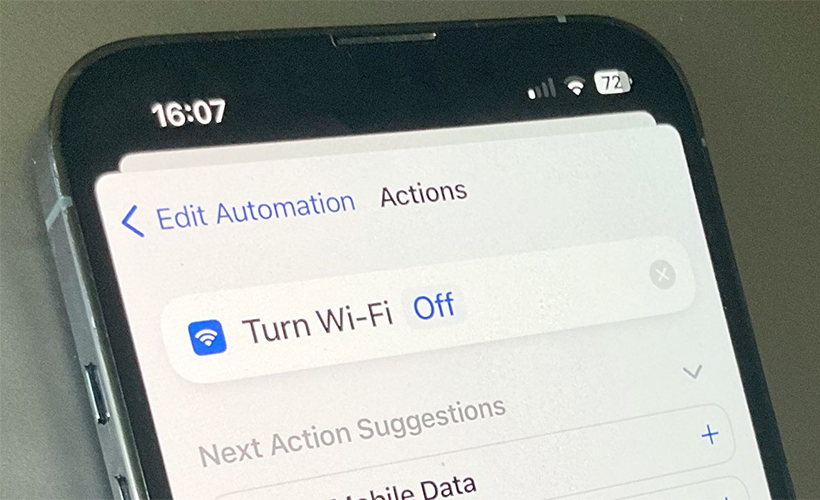
Apple doesn’t include this feature natively in iOS, but the Shortcuts app lets you create this automation in a few steps. The result is the same: Wi‑Fi turns on when you arrive at a place and off when you leave.
How to see who’s connected to your Wi‑Fi in seconds
Finding out which devices are connected to your home Wi‑Fi network is easier than it seems. The most direct way is to access your router’s admin panel by typing its IP address into a browser — usually 192.168.1.1 or 192.168.0.1 — and logging in with the device’s username and password. Inside, a section called “connected devices” or “DHCP clients” lists all active devices.
Another option is to use mobile apps like Fing, available for iOS and Android, which scan the network in seconds and display the name, IP address, and manufacturer of each connected device.
If you see any unknown device, the best move is to change your Wi‑Fi password immediately.
Links
- Automatic Turn on the WiFi in the morning – Apple Community
- Sell pre-owned Apple iPhone online – iGotOffer
- Everything About Apple’s Products – The complete guide to all Apple consumer electronic products, including technical specifications, identifiers and other valuable information.
How To Stop iPhone WiFi From Turning On Automatically – Full Guide [Video]
Video uploaded by GuideRealm on November 25, 2024.





Facebook
Twitter
RSS